AndroPods - Airpods on Android
- 4.1
- Rating
- 10.00M
- Installs
- Free
- Price

 Analysis by App-foxy
I tried AndroPods as a bridge between an Android phone and Apple AirPods, and its purpose became clear almost immediately: it is not trying to replace a full music player. Instead, it focuses on making AirPods and compatible Powerbeats Pro earbuds feel less awkward on Android. That distinction matters. If you already own Apple earbuds but use an Android phone, this app addresses the small daily annoyances that normally make the combination feel incomplete.
The app belongs to the Music & Audio category and is developed by Parkhomenko Vitalii. It is free to install, with optional in-app purchases priced at $2.99 per item. I would describe it as a practical companion rather than an essential audio platform. It does not change the sound signature of your earbuds or turn Android into iOS. Its value is in giving you a more convenient way to interact with hardware that was designed around Apple devices.
That makes the audience fairly specific. I would recommend it to someone who received or bought AirPods and does not want to replace them just because their main phone runs Android. I would be more cautious with it for a person shopping for new earbuds today, because Android-focused models may offer deeper integration without needing an extra utility. Still, for existing AirPods owners, the app can make the setup feel much more reasonable.
You May Also Like

 Blood Strike: 2.5 Anniversary
Blood Strike’s Loadouts Turn Every Drop Into a Tactical Gamble
A close look at Blood Strike’s custom loadouts: how fast access to signature weapons reshapes its battle royale rhythm, rewards preparation, and narrows the gap between fights.

 Pandora - Music & Podcasts
Pandora’s Music Is Easy to Start, but Harder to Recover
Pandora’s strength is its low-effort path from a seed to a station. Its weak spot is how much confidence it asks you to place in connection, setup, and quiet recovery.

 8 Ball Pool
 Is Built on Rivalries, Rematches, and Routine
A close look at the rivalries, rematches, shared routines, and unanswered safety questions that turn a quick pool match into a persistent mobile community.

 Samsung Music
’s Quiet Strength Is Playing What You Already Own
Its reach comes less from spectacle than from dependable access to a personal library. That simplicity is both the app’s strongest retention engine and its ceiling.

 AccuWeather: Weather Radar
AccuWeather Review: A Quick, Clear Forecast for Everyday Decisions
For everyday plans, the best forecast is the one you can understand quickly. AccuWeather makes rain timing, radar, and local conditions easy to act on, with a few trade-offs.

 Hill Climb Racing
Why Hill Climb Racing Still Turns Crashes Into One More Run
A tiny car, a bumpy hill and one more upgrade: Hill Climb Racing keeps resurfacing because its simple chaos makes every near-miss feel personal.
More From Our News Desk
View All News


What to expect before you install it
The most useful mindset is to treat AndroPods as an accessory layer. Your Android phone still handles Bluetooth pairing and audio playback, while the app helps present information and controls that are otherwise associated with Apple’s ecosystem. The experience depends on the particular AirPods or Powerbeats Pro model, the phone, and the Android version, so I would not expect every behavior to be identical across devices.
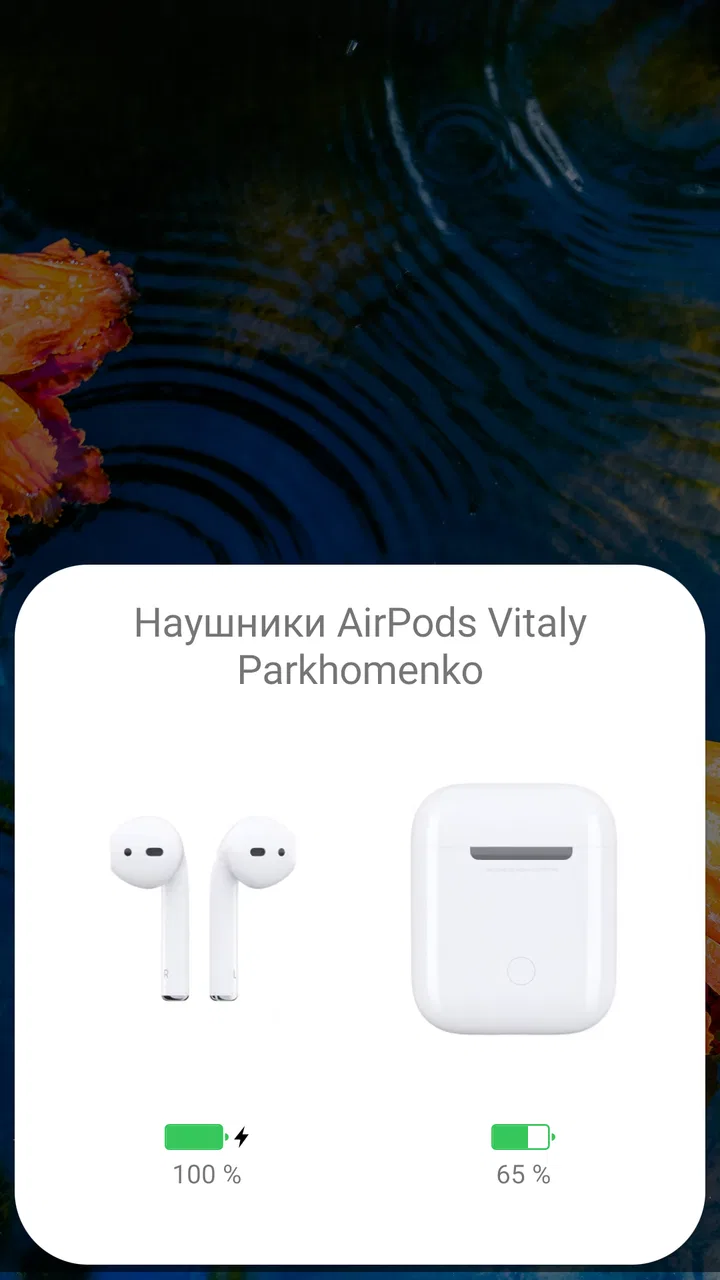
Its store summary describes the goal as simplifying the use of Apple AirPods, including AirPods Pro and Powerbeats Pro, on Android. In ordinary use, that means the app is aimed at the moments around listening: checking whether the earbuds are ready, understanding their remaining charge, and making the connection feel less like a workaround. Those details sound minor until you use wireless earbuds every day. Then, knowing whether you need to charge before leaving can save a frustrating trip.
The app has a 4.2 average from around 71 thousand ratings, with roughly 4 thousand written reviews, and it has passed 5 million installs. Those figures suggest that it has found a substantial audience, but I would not read them as a promise that every Android phone will behave the same way. Bluetooth accessories are unusually sensitive to phone software, battery-management settings, and the exact earbud generation.
AndroPods is rated for Everyone, which fits its straightforward purpose. It was released on February 2, 2020, and the current version is 1.5.28. Android 6.0 is the minimum operating system listed, so compatibility reaches back to older phones, although a newer device may provide a smoother experience simply because its Bluetooth and background-app handling are more modern.
One important expectation is that the app cannot erase the basic differences between Apple and Android. You should still think of the earbuds as Bluetooth accessories connected to a non-Apple phone. Some Apple-specific conveniences may not be available, and an update to Android, the earbuds, or the phone’s power-saving behavior can affect reliability. That is not a reason to avoid the app; it is a reason to judge it by whether it improves your particular routine.
Installing it without creating unnecessary confusion
For a first attempt, I would start with the earbuds in their case and make sure Bluetooth is enabled on the phone. Install AndroPods, open it, and follow the on-screen path rather than trying to configure every possible option before connecting. The first meaningful goal is simple: get the earbuds recognized and confirm that the app can show useful status information.
Keep the case nearby during setup. If the earbuds are already connected to a tablet, laptop, or another phone, that second connection can make the first Android pairing look broken when the real issue is that the earbuds are busy elsewhere. Turning off Bluetooth temporarily on nearby devices is a sensible troubleshooting step, especially in a crowded home or office.
I also recommend completing one clean connection before experimenting with optional behavior. New users often change several settings at once, then cannot tell which change helped or caused trouble. With a utility like this, a calm sequence works better: pair, check the status, play a short track, put one earbud back in the case, and observe what changes. That gives you a useful baseline.
If Android asks you to allow the app to operate in the background or to access a system function, read the wording carefully and decide whether the convenience is worth it on your phone. Different manufacturers organize these controls differently. Aggressive battery saving can stop companion apps from updating promptly, while unrestricted background activity may have a small effect on battery life. I would begin with the least permissive setting that still gives you the behavior you want.
The first success I would look for
Your first successful action should not be a complicated gesture or a deep settings change. Open the app with the earbuds connected and look for a clear indication that the left and right pieces, along with the case where supported, are being recognized. Then play audio for a minute and check whether the app remains useful when you remove one earbud or return it to the case.
This small test tells you more than a quick pairing notification. It checks the complete path you will actually use: connection, listening, status awareness, and a change in the earbuds’ physical state. If that sequence works, AndroPods has already earned a place in your routine. You can leave it alone and enjoy the convenience rather than constantly managing it.
A realistic example is a morning commute. I might take the earbuds from the case, connect them before leaving, and use the app to make sure both sides have enough charge for the trip. If one side is unexpectedly low, I can choose another listening plan before reaching the train platform. That is the kind of practical benefit I noticed: not dramatic new audio quality, but fewer surprises at the moment I need the earbuds.
Another useful routine is checking the status before a call. If you normally use one earbud for a conversation, confirm that the piece you intend to use is active and charged instead of discovering the problem after the call begins. AndroPods is most valuable when it becomes a quick preparation tool, not an app you stare at throughout the day.
Where the experience can feel less obvious
The first common confusion is assuming that seeing a battery indication means the phone has gained complete control over the earbuds. It has not. Battery information and connection assistance are different from Apple’s full device ecosystem. If a familiar iPhone behavior is missing, that does not necessarily mean the Android app has failed; it may simply be outside what this combination of hardware and software can reproduce.
The second confusion is mixing up the charging case with the earbuds themselves. Wireless earbud status can change as soon as one piece is removed, returned, or disconnected. Give the app a moment to refresh before deciding that the reading is wrong. I found it more useful to look for a consistent pattern across several open-and-close cycles than to judge it from one instant.
A third point concerns automatic behavior. If the app appears inconsistent after the phone has been idle, check the phone’s battery-management controls before reinstalling anything. Android manufacturers sometimes suspend background processes to save power. That can make a companion utility seem unreliable even though Bluetooth audio itself continues to work. Allowing the app to run as needed may improve updates, but I would not grant broad background access blindly if you rarely use the status features.
There is also a difference between audio playback and accessory information. Music may continue normally even when the app is not displaying an updated status immediately. Conversely, the app may show a connection state while the media output is still assigned to the phone speaker. If that happens, check the Android audio output selector and Bluetooth connection rather than repeatedly tapping inside the app.
Users can also misunderstand the role of the developer, Parkhomenko Vitalii. This is an independent utility focused on a narrow compatibility problem, not Apple’s official Android application. I would therefore keep expectations realistic about how quickly it can respond to changes in Android or changes in Apple hardware. The app can be useful without carrying official Apple branding, but that distinction is worth remembering when troubleshooting.
Small habits that make it more dependable
My first practical tip is to establish a charging habit based on your real use rather than trusting a single status check. If you use one earbud for calls and both for music, the two sides may not drain evenly. Checking both before leaving is more informative than checking only the case. This is especially helpful for people who alternate between earbuds during work.
My second tip is to test the app in the places where you actually listen. A connection that works perfectly in a quiet room may behave differently in a busy station, gym, or office full of nearby Bluetooth devices. I would not immediately blame AndroPods if the first outdoor test is imperfect. Repeat the same short routine in the location that matters to you and decide whether the convenience is stable enough for your needs.
My third tip is to avoid using the app as a substitute for basic Bluetooth housekeeping. If you change phones, remove an old pairing when necessary and connect the earbuds to the device you actually want to use. If several devices compete for the connection, no companion app can make that situation completely effortless. A clean pairing list often improves the experience more than changing several app options.
A less obvious trade-off is that convenience may require some background activity. If your priority is maximum phone battery life and you rarely need earbud status, you may prefer to open the app only when checking the charge. If your priority is knowing the condition of the earbuds without thinking about it, you may accept the extra system involvement. I like having that choice rather than treating one behavior as correct for everyone.
How it compares with the usual alternatives
The most obvious alternative is using AirPods directly through Android’s normal Bluetooth controls. That approach is perfectly adequate if all you want is basic audio. It is simpler, uses fewer moving parts, and may be the better choice for someone who never checks battery information or accessory status. In that situation, adding a companion app can feel unnecessary.
Another alternative is switching to earbuds designed specifically for Android. Those products may offer more native controls, easier access to their own companion software, and closer integration with the phone brand. If you are buying from scratch, I would compare those options carefully instead of assuming AirPods are automatically the best fit. AndroPods makes an existing investment more comfortable; it does not remove the argument for choosing hardware built around your platform.
Compared with a general music player, AndroPods has a much narrower job. A music player organizes tracks, playlists, and playback, while this app concentrates on the relationship between the phone and Apple earbuds. I would use it alongside the music service I already prefer, not instead of one. That focused design is a strength when you need accessory information, but it also means the app will feel pointless if your main concern is discovering or managing music.
Compared with Apple’s own ecosystem, the Android experience remains less unified. An iPhone can provide a more seamless relationship with AirPods because both products come from the same platform. AndroPods narrows that gap in useful everyday areas, but it is not a reason to expect identical behavior. For me, the right question is not whether Android becomes an iPhone; it is whether the app removes enough friction to justify keeping the AirPods.
Who should use it and who should skip it
I think AndroPods is a good match for an Android user who already owns AirPods or Powerbeats Pro and wants more awareness of their status than plain Bluetooth settings provide. It is also sensible for someone who moves between listening, commuting, and calls and wants a quick check before putting the earbuds away or leaving home.
I would be less enthusiastic for a person who expects advanced audio customization, a complete replacement for Apple’s device integration, or guaranteed identical behavior across every phone. I would also suggest skipping it if your current Bluetooth connection already does everything you need. Free installation makes trying it low-risk, but an app still has to earn its place in your daily routine.
The optional purchases are $2.99 per item. Before paying for anything, I would use the free experience long enough to confirm that the connection and status behavior are reliable on your phone. The important test is not whether the app looks useful in theory; it is whether it solves the particular annoyance that led you to search for it.
My next-step recommendation
After the first successful connection, I would spend a few days using AndroPods naturally rather than exploring every setting immediately. Check the earbuds before a commute, test one-earbud use during a call, and observe what happens after the phone has been idle. Those three situations reveal whether the app is genuinely helping you or merely adding another icon to your phone.
If the experience is stable, keep a simple routine: connect the earbuds, verify the pieces you plan to use, and close the case when finished. If updates become delayed, investigate Android’s background and battery controls before assuming the hardware is defective. If basic audio works but the extra information does not matter to you, return to ordinary Bluetooth use and keep things simpler.
Overall, I see AndroPods as a focused and practical solution to an awkward platform pairing. It is free, accessible to a broad range of Android users, and supported by a large installed base, but its usefulness depends on your earbuds, phone, and expectations. For an Android owner who already has AirPods, the app is worth trying because it can turn a frustrating compromise into a manageable daily setup. I would recommend it as a compatibility helper, not as a replacement for Apple’s ecosystem or for an Android-native earbud system.
FAQs for AndroPods - Airpods on Android
01How do AndroPods enhance the AirPods experience on Android devices?
AndroPods app enhances the AirPods experience by enabling features typically reserved for Apple devices. It provides battery level notifications, automatic ear detection, and customization options for gesture controls. This app bridges the gap between Android and AirPods, making the integration seamless and user-friendly.
02Is AndroPods compatible with all Android devices and AirPods models?
AndroPods is designed to work with most Android devices running Android 5.0 or higher. It supports various AirPods models, including AirPods Pro. However, the functionality might vary slightly depending on the specific model and Android version. It's advisable to check the app’s compatibility list for detailed information.
03What permissions does AndroPods require for optimal performance?
To function effectively, AndroPods requires permissions such as Bluetooth access to connect to AirPods, notifications access for battery alerts, and location to help with connectivity issues. These permissions ensure the app can deliver a comprehensive and integrated experience, similar to using AirPods with an iOS device.
04Does the AndroPods app affect the battery life of my device or AirPods?
While AndroPods is designed to minimize battery consumption, any app that runs in the background can have a slight impact on device and accessory battery life. However, the app is optimized to ensure that this impact is minimal, allowing users to enjoy their AirPods without significant drain.
05Are there any in-app purchases or subscriptions required in AndroPods?
AndroPods offers a free version with essential features, but it also includes a premium version available through in-app purchases. The premium version unlocks additional features and customization options, providing a more enriched experience for users who want to make the most of their AirPods on Android devices.
Pros
- Easy setup with clear instructions.
- Customizable touch controls.
- Battery status notifications.
- Seamless connectivity experience.
- Supports multiple AirPods models.
Cons
- Limited features in free version.
- Occasional connectivity issues.
- Ads can be intrusive.
- No support for older Android versions.
- Lacks detailed sound customization.

AndroPods - Airpods on Android
Gallery